B-to-B Web Client gives “Tip-of-the-Cap” to DigitalDay
Our client, Closure Systems International, the world’s largest bottle cap manufacturer, is pretty proud of their new website. They just sent us the following press release where they give us a very nice mention. We thought we’d share:
MARCH 28, 2013 – INDIANAPOLIS – Closure Systems International, in conjunction with their online marketing agency – DigitalDay, recently launched a redesigned website (csiclosures.com), enabling users to quickly find information with efficiency and ease. With a fresh and inviting new look, the site delivers information on CSI products using powerful new search capabilities and tools. Also importantly, the website serves as an entry portal for CSI’s e-commerce customers (csiclosures.biz), includes a CSI Careers link, and highlights important CSI sustainability initiatives.
“CSI has commercialized many new closures and equipment offerings across its product portfolio in the last few years. To assist our customers in evaluating and choosing the ideal closure options for their packages, we redesigned our website to deliver a wealth of updated information quickly and easily,” said Jane Haywood-Rollins, CSI Global Marketing Services Manager. “We simplified the navigation process so that visitors can now find what they need efficiently, using fewer clicks.” The CapFinder feature enables easy customized searches by market, application process, bottle finish, closure diameter, closure material, brand name, and package type.

The new site also underscores the value CSI brings to its customers through a system of carefully matched closure and capping solutions. The site explains how CSI helps their customers maximize their profits by enhancing the marketability of their brands and by increasing capping efficiency – thereby reducing their total cost of operations. Included are product detail pages for all CSI closure profiles, capping equipment offerings, and global technical services.
“A key goals in the design and development of the new CSI website was to create a best-in-class experience to ultimately increase sales leads and conversions,” said Mark Vitullo, Strategy & Marketing Partner at DigitalDay. “To do this, we employed today’s best-practices for usability, search engine optimization and language translation – built on Sitecore CMS, a powerful content management and marketing automation platform.”
The next upgrade to the site, which is already under development, will offer content in Spanish, German, Portuguese, Chinese and Japanese languages. Visit CSI’s redesigned website at www.csiclosures.com.
About CSI
Closure Systems International, Inc. (CSI) is recognized as a global leader in closure design, manufacturing, and high speed application systems. In addition to quality closures and capping equipment, CSI provides unparalleled customer and technical services globally. Major categories served include carbonated soft drinks, bottled water, juices, isotonics, teas, adult beverages, dairy, foods, and automotive fluids.
CSI’s closure systems solutions help customers maximize profits by increasing the marketability of their brands and optimizing their total cost of operations. In its 30 locations worldwide, CSI employs approximately 3,800 people. CSI is part of Reynolds Packaging Division, an operating division of the Rank Group. Visit CSI’s website at www.csiclosures.com.
About DigitalDay
Since 1998, DigitalDay has been known as one of the Midwest’s premier web design firms. Based in Cleveland, OH, DigitalDay is a full-service online marketing agency, providing strategic counsel and exceptional creative and technical support to some of the country’s most respected national and regional marketers. A Certified Sitecore Partner, clients rely on DigitalDay to be their online marketing experts – by augmenting their marketing staff to collaboratively develop strategy upon which design solutions are derived, technology is implemented, and customer’s online programs are maintained. To learn more, visit www.digital-day.com or find us on Facebook.
Three Links About Mobile Optimized Email That Changed My Life
by Shane Geisheimer
Here at DigitalDay, we’ve been talking about optimizing for mobile devices a lot lately. Most of that conversation has centered around Mobile Website Optimization and Responsive Website Design for the Mobile Web. As part of that, it’s been a natural segue into optimizing Email for Mobile Devices.
In a survey (of 1) of my email Inbox I looked at 10 emails from recognizable Brands and surprisingly found that 0 for 10 these emails that were optimized for mobile devices.
You may ask, why is that surprising? Shouldn’t big brands with large budgets be dedicating a portion of their budget to developing mobile optimized experiences? I mean c’mon, they spend countless hours of resource time optimizing for open rates and click-through rates by Multivariate testing and Subject Line testing. But when you think about what changes you have to make to optimize for mobile devices you start to understand more about why this fundamental shift hasn’t taken place in email design.

First of all, it takes some CSS ninja skills to pull it off and most companies don’t have the kind of experts we do on staff . . . but that’s not the reason.
If you take a closer look at what the structure of a Mobile Email Design requires, the light bulb goes off. For more than a decade designers and marketers have been trying to create an environment where email recipients can get relevant content from the Brands in a newsletter-like format, where they can get previews and click for more information. In fact many marketers call their monthly emails, Email Newsletters. Actually, we’re just as guilty of doing this. But the reality is that emails ought to be nothing more than a notification that triggers a response, at the most basic level.
We spend time tweaking and optimizing the content to convert to clicks, like any other form of digital marketing. Wait a minute, keywords… optimize, convert and clicks. Bingo! Email needs to intice people to click on it. We’ve seen approaches from all images, to text-heavy structure. But if you take the content and break it down you have images, text and links. A more responsive layout therefore takes the content and in a smaller viewport/screen size stacks the content… just like it does in a Mobile Web Browser.
So what is the real reason that this paradigm shift hasn’t taken place? Simple, the Email/Web Design Community has not truly embraced designing to accomodate a Mobile Optimized layout. This takes a modular approach and with it comes a drastically different way of approaching an Email Design than is traditionally done today. Brand marketers simply have not taken this approach and therefore emails continue to be disseminated as “old-school” layouts.
So what are these 3 links that I speak of?
- The first outlines the secret sauce to pull this off technically: Make Your HTML Email 5½ Times More Mobile Friendly
- The second gets down and dirty with how this concept can be brought to life and business cases for it: Email + Mobile
- And the 3rd puts it all into perspective: Email Client Market Share: New Stats
So how do we get from ground zero to becoming experts? Well the first thing is to go out to these sites, sign-up for their newsletters and begin seeing real world examples:
http://www.3sixty.com
http://fab.com
http://www.pinterest.com
http://www.campaignmonitor.com
Again, this isn’t far off from Responsive Design for Mobile Web. So similar rules apply.
How do we truly embrace this? Most importantly, we need to continue to educate our clients to get them to break the old paradigms and demonstrate improved results. Secondly, we need to challenge our information architects, designers and developers to think mobile in everything they do.
We’ve embraced the second part here at DigitalDay — now it’s up to the clients.
DigitalDay Supports Pediatric Stroke Awareness Month
Cuyahoga Falls, OH – May 31, 2012 -The DigitalDay team showed support for Pediatric Stroke Awareness Month and team member Ryan Perry’s daughter, Madelyn, by sporting “I support Madelyn” t-shirts outside the DigitalDay office Tuesday, May 29.
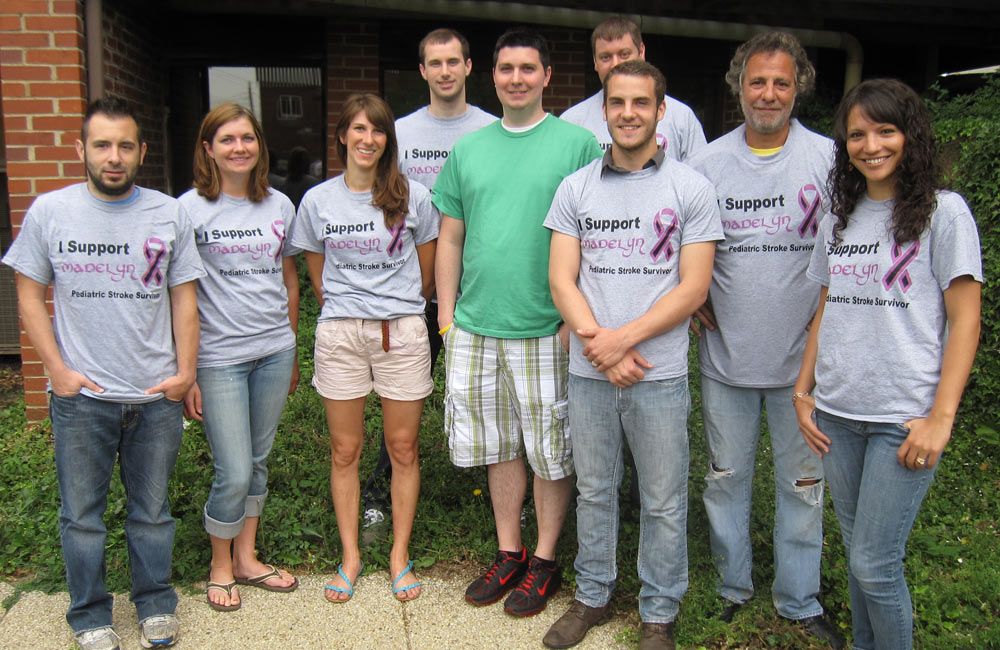
Two-year-old Madelyn Perry had a stroke around the time of her birth, prompting the Perry family to raise awareness of pediatric stroke by lobbying the Ohio government. In February 2012, the Perrys read their testimony publicly, and Ohio declared May Pediatric Stroke Awareness Month.
DigitalDay team member Ryan says that there is not a lot of research currently being done about pediatric stroke. Raising awareness of the condition helps parents to recognize the signs and symptoms of pediatric stroke so they can get help and start early intervention therapy quickly.
Today, Madelyn is a healthy toddler who will be turning three in September. She takes physical and occupational therapy and dance classes several times a week to help stretch the muscles on the right side of her body that were affected by the stroke.
Proceeds from the “I support Madelyn” t-shirts worn by the DigitalDay team went to the Children’s Hemipelegia and Stroke Association (CHASA), a nonprofit organization that supports families and children who have been affected by pediatric stroke. For more information about pediatric stroke or to donate, visit chasa.org.
DigitalDay is a full-service online marketing agency serving national and regional marketers in website and mobile strategy, design and development, online promotions, email marketing, search and social media optimization, application development and hosting.
Stop Talking. Start Doing
Analysis Paralysis — we see it so often, specifically when it comes to launching online marketing initiatives. Sure, it’s important to minimize risks and that’s what a good process will help to do. But all risk can’t be eliminated. Fortunately, digital marketing allows you to test, react and adjust.
We’ve always been a proponent of “Launch & Learn” because if you wait for an online strategy, or a website concept, or a social media plan to be perfect, you’ll always be late to the game.
SXSW 2011 – How to Use Web Personalization Without Being Creepy
Web personalization takes many forms today. Using information provided by users can improve the user experience by allowing companies to deliver more relevant content to that individual. But when does it cross the line from being useful and convenient, to being flat out creepy?

How to Personalize Web Content Without Being Creepy
From targeted Facebook advertising, to Foursquare restaurant suggestions to personalized web content, the key elements to think about is how this information about a user is obtained, how it is used and how this process is explained to the user.
Some main points that seemed to surface from the SXSW panel on Web Personalization were:
– Relevance in web content is becoming increasingly more important as the web gets more crowded. Users need to, and will appreciate, the ability to filter things out that are relevant to them. Life is too short to see a generic website.
– When asking for and using user’s information, trust is important – and extremely fleeting if you violate it. Users are providing information to a site for a reason. Make sure that it is clear to those users what they will be getting in return. It’s all about setting expectations and living up to them; transparency is key. Explain to the user that their information is being used to perhaps, purchase a product, but that it also may be used to improve their future site visits (think YouTube’s “We know you watched this video, so you may like this one.”) Make it obvious why contributing your data makes your experience better.
– Consider the subtle difference between customization and personalization, and utilize each appropriately. Customization allows users to choose what they want to see or not see to improve their experience on a site. Personalization implicitly or explicitly takes some information then automatically uses it to drive the user experience in a different way. Both are effective, but maybe suited to different situations.
– Give people an out. As Facebook connect and other personalization services are allowing for quick and highly integrated personalization, some people may not be comfortable with it. Why force them into a situation they may not be happy with? A simple “off” button on a feature or application may be enough to preserve that level of trust with an important customer.
While it may seem like most of this is somewhat common sense, it’s good to review these mental checks to ensure that the trust and benefit of the user is kept at top of mind. Personalization can then become a strong, mutually beneficial tool for the user and the company when relevant content, products or services are more easily delivered to an individual.
SXSW 2011 – Augmented Reality for Marketers – 10 Cool Examples
Augmented reality: overlaying a digital experience on top of our real world. The panel on this topic consisted of two people: Lynne D. Johnson of R/GA and John Havens of Porter Novelli.
According to Juniper research, the current global revenue for augmented reality (AR) is currently less than $2 million, but is projected to be around $1.5 billion globally by 2015.
The presenters laid out the current state of AR as such: one side of the spectrum starts with basic applications like QR codes, moves into a bit more complicated applications that require you to hold a piece of paper in front of a webcam to see a 3D hologram on your photo viewer, to similar POS applications and location based smart phone apps to real world applications, like ski goggles that show the elevation of the mountain, etc. as you’re skiing down.
Johnson described many of the current applications to be quite “awkward” – you have to hold up your phone to see these things, or print out a piece of paper and wave it in front of your webcam. The future of AR, the panelists said, is working AR into the everyday, via glasses/goggles or even AR contact lenses.
The presentation was rich with visual aides – which is really the best way to see the current state of AR or imagine the future of AR. Here are some of the augmented reality examples that they highlighted:
1 – QR codes – for Zoo Records were hidden around cities for users to scan and hear hidden sound records from local groups.
2 – Tissot watches – sit in front of your computer and virtually “try on” the different styles.
3 – Location based augmented reality: Stella Artois bar finder on your smart phone.
4 – POS augmented reality application: LEGO augmented reality kiosk shows what’s inside the box.
5 – Real-world application: GM Augmented reality windshield technology.
6 -Tagwhat – you tag the world. Think “outernet” vs. internet.
7 – iPhone RFID: object-based media – location-based urls with your phone – wave your phone by an object and it tells you something about it, drives you to a URL.
8 – stickybits – Scan a barcode on a product, then leave a comment so that the next person that scans that will read the comment, too.
9 – Kraft / Anonymous Video Analytics (AVA) – recognizes demographics about you from scanning your face/body type, then serves up ads/products to you that it thinks you’d be interested in.
10 – Future concerns – privacy, marketer’s virtual air rights. Will we have augmented reality overload?
SXSW 2011 – App, Schmapp – Pointers for Moving from Web to App
Aaron Forth, from mint.com, shared his experience taking his financial planner web application and building a successful app that people actually use. Mint.com has seen huge user adoption for their app for iPhone, Android (and soon to be iPad). According to Forth, right now 67% are using the iPhone app, and 33% are on Android – but this is growing. Total app downloads have grown 200% in just the last couple of months. One interesting point is that 20% of mint.com users actually only use the app and don’t even go to the site. Something, he argues, isn’t a bad thing.
Here are some of the key takeaways:
– Pick platforms carefully. You want to consider device adoption, how apps are available to the consumers, what support you can get when building apps for different platforms, and look for low fragmentation. Yes, one of your potential consumers may be surfing on Blackberry, but you’re going to open up a whole other can of worms for UI, development, QA, support, etc. that just may not be worth it.
– Make your app a companion for your website, not replacement. Think long and hard about what features the App is best suited for. How do people use those devices? Make “on the go” utility – don’t try to cram everything in the phone that the phone isn’t really meant for. Think quick overviews, easy on-the-go decisions and actions, and notifications that require the user to go back to your website to complete more complicated tasks.
– When approaching your app development, think what can you reuse from the existing site? (Answer should probably be, not much.) Then, think about what you’ll need to rethink.
- Leverage things like branding, data (financial data from financial institutions in this case) and user profile information.
- Things you need to rethink will most likely be:
- UI & visual design (gesturing, one button controls)
- Mobile security features – (mint.com allows you to go to the website and disconnect the mobile app connection in case you lose your phone, and thus important personal financial information.)
- Skills/development resources you’ll need to code
- Service layer & architecture (different APIs than using on the web – bursts data, instead of stream)
- Authentification (encrypted cookie where it times how long you want it to remember your login before you have to login again, ~ 2 weeks – allows for some security, yet ease of use for consumer)
- QA build & release
Bottom line is this: When thinking about an app, think about use cases and design from there. Gimmicky apps may not stand the test of time and copying your entire site functionality probably won’t suit the device. Consumers are simply looking for something that will make their lives easier. It’s your app’s job to deliver.
SXSW 2011: Marketing Budgets Have Gone Social: Is It Working?
Panel #1 at SXSW 2011: Marketing Budgets Have Gone Social: Is It Working? Important stuff, right? …So much so that it meant I got to enjoy my first ever SXSW panel seated on the floor behind the stage, huddled in with about 15 other interested SXSWers who found out that being 30 minutes early doesn’t always guarantee you a chair. Easy to make new friends when you’ve got the icebreaker, “Yeah, I can’t feel my legs either…”

But regardless of the fact that we were hearing the message from the backs of heads, the theme was still clear. The answer to Marketing Budgets Have Gone Social: Is It Working, is not a very clear one.
The panelists represented huge companies like PepsiCo, General Mills, Hershey and Samsung. They admitted that gleaning clear ROI stats from social media is still something we’re all trying to figure out. But, it’s also clear that the piece of the pie in marketing budgets for social marketing has grown, and that this is a necessary growth if companies want to communicate and engage consumers in the way they want to be communicated with and engaged.
Though it’s hard for three knowledgeable panelists to make wholly cohesive arguments in only an hour, there were some interesting stats and anecdotes thrown out:
Rough Stats
According to the panelists (Julie Hamp of PepisCo, Kris Narayanan of Samsung, David Witt of Hershey (formally General Mills))…
– eMarketer says that in 2011, social budgets are expected to grow 60%
– General Mills social budget is about 5% of the marketing budget for all their brands
– Across PepsiCo’s 500 worldwide brands, social budgets run from 10% of the marketing budget to 100% (on big campaigns like Pepsi Refresh). On average, the social budget piece of the pie has increased 30% recently
Mini Case Studies
– Sales soar using a POS social promotion
– A promotion linking Foursquare, Hess convenient stores and Brisk, in which users were encouraged to check in with Foursquare at Hess locations and be rewarded with a BOGO deal on Brisk, resulted in a 200% increase in this social interaction at POS and sales went up 141% during that time.
– Using social media promotions that drive users to purchase
– Promo with Brisk and Instagram, users are asked to submit photos using Instagram and 50 photos will be chosen to be featured on a Brisk can. Did your photo get chosen? Better buy some cans and find out. It did get chosen? Better tell your friends and family so they buy the cans. This word of mouth action and the brand awareness surrounding it will drive people to purchase.
– Use key influencers early on for positive word of mouth in the social realm
– When General Mills Fiber One bar was released, it was advocated for on the Hungry Girl email with the line, Fiber One is better than Snickers. Because the product itself was so good and exceeded expectations of the user, this positive word of mouth from key influencers was huge. General Mills saw online conversation to be the 2nd most important driver of sales here, (only second to the product actually being on the shelves). Though it may not be able to be calculated as direct ROI, there was a strong correlation between online conversation, brand experience and sales for a given product.
SXSW Interactive 2011 – Very Cool.
As winter in Cleveland/Akron dragged along and SXSW 2011 got closer and closer, I began to consume everything I could to prepare myself for my first time at SXSW. I checked out the official SXSW website, read the FAQs, sifted through the panel topics. I read tweets, I read blogs, I Googled. And, admittedly, I started to get nervous. Oh no, I thought, I’m not cool enough for SXSW.
This thing is going to have top digital and interactive thought leaders, panels and parties galore, thousands of interactive, music and film fans mulling about meeting and greeting in what looks like an awesome town, Austin, TX. What would I wear, where should I go…could I fit in and keep up?
About 15 minutes into Day 1, my answer came in the form of a sigh of relief, a huge smile and the thought, “Ok, this thing is awesome.”

The weather was gorgeous (narrowly escaping a March dump of 10 inches of snow in Cleveland and ending up in a place with high 70s and sun…yes, please!), the town was beautiful (a mix of cool restaurants, shops, trees, rivers, bikes, college students, and friendly people) and the crowd and content at SXSW was inspiring. Conversation starts naturally with the people around you, and new ideas and excitement are constantly floating around you (not augmented reality-style (more about that later…), but the feeling is quite palpable.)
So for anyone interested in SXSW, it’s definitely something to experience that will provide you with new ideas for your approach to web and interactive, and get you excited for what is to come in this digital world.

We’ll be posting a series of blogs on some of the topics presented at SXSW 2011. There were some panels and talks that were better than others, but overall it was an interesting mix of topics, definitely worth some additional thought and conversation.
So, ok, maybe my worries about my lack of SXSW “coolness” were unfounded. I had a great time and felt totally comfortable. But, at the same time, there is an advantage to not being (or at least thinking that you are) the coolest person in the room – you get out of your comfort zone, get inspired by others and definitely learn some pretty “cool” stuff.


 DigitalDay Break -- Web Design News
